Look PowerPoint Template: A Strategic Foundation for Modern Presentations
In a world saturated with information, the ability to present your ideas with clarity, professionalism, and impact is not just a soft skill—it’s a strategic advantage. Whether you are pitching to investors, training a team, or defining your company’s profile, your presentation is often the primary interface for your message. The Look PowerPoint Template is designed to be more than a collection of slides; it is a structured, contemporary framework intended to elevate this critical communication from a mere task to a deliberate tool for achieving better results.
The Strategic Utility of a Designed Framework
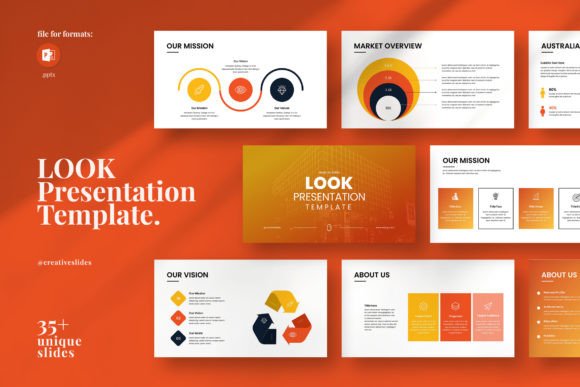
Starting a presentation from a blank slide is an act of creation, but it is also a potential source of distraction. Decisions about layout, color, typography, and data visualization can consume valuable time and mental energy that should be directed toward refining your content and narrative. The Look PowerPoint Template addresses this by providing a professional and clean starting point. Its simple yet powerful design—with curated photo layouts, infographics, tables, and diagrams—allows you to focus strategically on what you are saying rather than how it looks. This separation of content from form is a practical decision that supports productivity and ensures a consistent, high-quality visual output.
Think of it as the architecture for your message. A well-designed template enforces visual discipline, which in turn enhances comprehension and retention for your audience. By using the Look PowerPoint Template, you are not just making slides; you are adopting a system that helps structure complex information, guide viewer attention, and reinforce your professional credibility from the first slide to the last.
Aligning Design with Goals and Audience
A template’s value is not inherent; it is realized through intentional use. Before even opening the file, consider your core objective. Is this presentation meant to persuade, inform, inspire, or instruct? The Look PowerPoint Template, with its versatile 36-slide structure and multiple master slide options, accommodates these varied goals. For instance, its creative photo layouts are ideal for showcasing products or team culture in a company profile presentation, while its infographics and diagrams are powerful tools for breaking down operational processes or market data in a planning session.
Planning Your Content Within the Framework
Approach the template with a content-first mindset. Draft your key messages, data points, and narrative flow independently. Then, map this content to the appropriate slides within the Look PowerPoint Template. Use the theme color option to align with your existing branding, reinforcing long-term brand consistency. The included vector icons and resizable graphics can be adapted to symbolize specific concepts, making abstract ideas visually tangible. This process of matching content to designed elements is a thoughtful exercise in clarity, ensuring each slide serves a distinct purpose in advancing your overall argument or story.
Operational Flexibility for Diverse Teams
A notable strategic feature of the Look PowerPoint Template is its commitment to accessibility. The promise of “NO KNOWLEDGE REQUIRED IN ANY APPLICATION” and availability in many formats is a deliberate nod to real-world collaborative environments. In any organization, presentations are often created or edited by individuals with varying technical proficiency—from senior executives to marketing assistants. This template reduces friction.
Being fully editable in Microsoft PowerPoint PPTX format, with easy drag-and-drop picture replacement and resizable elements, means that updates and customizations can be made quickly without specialized design skills. The fact it works on both Apple and Windows systems further removes operational barriers. This flexibility ensures that the template is a sustainable resource, not a one-use asset. It can be adopted as a company-wide standard for internal and external communications, creating a cohesive visual language that scales.
A Note on Intentional Editing
The ease of use, however, carries a subtle risk: the temptation to edit without a plan. Simply dropping text and images into beautiful slides without considering narrative cohesion can result in a disjointed final product. Use the template intentionally. Leverage the master slides to maintain uniformity. Pay attention to the 16x9 Full HD ratio (1920x1080px) to ensure your presentation displays flawlessly on modern screens and projectors. The free fonts and included help links are resources meant to support proper use—consult them to maintain the template’s professional integrity.
Long-Term Value Beyond the Single Presentation
Investing in a robust template like Look PowerPoint Template is an investment in future efficiency and quality. The 36 slides provided are not all meant to be used in one presentation; they are a library of possibilities. Over time, as you create multiple presentations for different purposes—client proposals, annual reports, training modules—you will develop a familiarity with the system. This reduces setup time for each new project and allows you to build a repository of consistently formatted slides that can be repurposed or adapted, enhancing operational efficiency.
The inclusion of a bonus 4000 PPTX icons and theme color options extends this long-term utility. Icons are a universal visual language; a well-chosen icon can communicate a concept faster than text. Having a vast, integrated library at your disposal encourages you to think visually, enriching your communication style over the long term.
Support as a Strategic Safety Net
The provision of free real support from skilled designers is a feature that underscores the template’s professional foundation. It transforms the product from a static file into a supported solution. If you encounter a unique branding challenge or need guidance on a complex customization, this support acts as a safety net, ensuring you can achieve the specific result you need without being limited by your own technical expertise. It’s a consideration that adds reliability to your planning process.
Remember that the support images used in the demos are not included, which is a standard practice. This clarifies that you are purchasing the design framework itself, and it encourages you to populate it with your own authentic imagery and data, which is crucial for creating presentations that truly reflect your unique work and company profile.
Making the Final Decision
Choosing to use the Look PowerPoint Template is a practical decision about resource allocation. It asks you to weigh the time and cost of developing custom designs for every presentation against the value of adopting a pre-built, high-quality system that can be customized. For most entrepreneurs, educators, freelancers, and business owners, the latter is a strategically sound choice. It frees up creative and operational bandwidth to focus on the content that actually drives decisions, influences audiences, and achieves outcomes.
Ultimately, the Look PowerPoint Template is a tool. Its power is unlocked not by simply opening the file, but by integrating it into a thoughtful process of goal-setting, content planning, and audience consideration. When used with this intention, it becomes a reliable partner in presenting your work on another level—clean, contemporary, and powerfully professional.