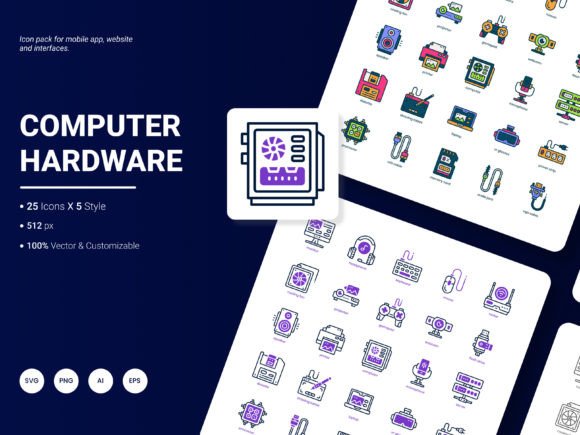
Computer and Hardware Icon Pack: Your Digital Toolkit for Visual Communication
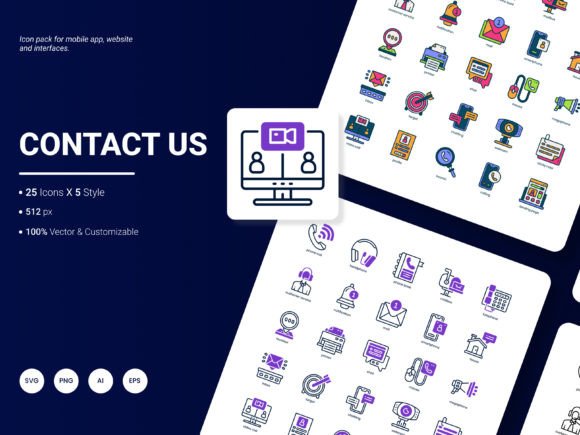
In today's fast-paced digital environment, conveying complex ideas quickly and clearly is paramount. Whether you're designing a user interface, preparing a client presentation, or building an instructional manual, the right visual assets can make all the difference. This is where a specialized Computer and Hardware Icon Pack becomes an indispensable resource. This collection isn't just a set of generic images; it's a curated toolkit of 25 icons, each available in five distinct styles, designed to represent the most popular services, components, and concepts in the tech world.
Where This Icon Pack Finds Its Purpose
Imagine you're a startup founder pitching your new cloud storage solution. A slide filled with dense text about servers, networks, and security will overwhelm investors. Instead, integrating clear, professional icons for "data center," "encryption," and "cloud sync" instantly clarifies your architecture and value proposition. The pack’s versatility across website design, mobile applications, presentations, analytical reports, infographics, and website templates means it serves as a single visual language for all your communication channels.
Scenarios and Industries That Benefit
For IT consultants and service providers, these icons can transform a lengthy service catalog into an easy-to-navigate visual menu on a website. A graphic representing "hardware repair" next to "network diagnostics" helps clients self-select the service they need. In the education and training sector, instructors creating e-learning modules for computer literacy can use the icons to label sections or illustrate step-by-step guides, making technical content more accessible to learners.
Software developers and UX designers face the constant challenge of creating intuitive interfaces. Using consistent, recognizable icons for actions like "upload," "download," "settings," or "device connect" enhances user experience and reduces cognitive load. The availability of multiple styles—from flat and minimalist to more detailed outlines—allows designers to match the icon aesthetic precisely to their application's brand personality.
Practical Considerations Before You Begin
While the utility of a Computer and Hardware Icon Pack is broad, a few practical considerations will ensure you get the maximum value. First, assess the file formats provided. This pack includes AI, EPS, SVG, PNG, PDF, and JPG. SVG files are crucial for web development as they scale perfectly without loss of quality, while PNGs with transparency are ideal for mockups and digital presentations. If you plan to edit colors or combine elements, the vector formats (AI, EPS) are essential.
Secondly, think about style consistency. With five styles included, you have flexibility, but it's wise to commit to one style for a single project to maintain a cohesive look. For example, a technical whitepaper might benefit from the cleaner, simpler icons, while a marketing brochure for a gaming hardware company might use the more detailed, vibrant style.
Strengths and Flexible Integration
The core strength of this pack is its specialized focus. Unlike generic icon sets, these 25 icons are tailored to computer and hardware themes, meaning you won't waste time searching for a suitable "microchip" or "router" symbol among hundreds of irrelevant options. The editable nature of the vectors means you can adapt them without needing advanced design skills. You can change colors to match your brand palette, resize without pixelation, or even combine icons to create new, compound symbols for unique concepts.
Integration is straightforward. For web designers, the SVG files can be embedded directly into code. For graphic designers, dragging the PNGs into a layout in Photoshop or Canva is a matter of seconds. The multiple formats act as a bridge between different professionals working on the same project—a developer, a designer, and a content writer can all use the same visual assets from their preferred software.
Exploring Different User Perspectives
The value of this icon pack shifts depending on the user's role and needs. A non-design professional, like a project manager or a systems analyst, might use these icons primarily in reports and PowerPoint presentations to create more engaging and understandable status updates for stakeholders. For them, the ready-to-use PNG and PDF formats are likely the most helpful.
Conversely, a freelance designer or agency will appreciate the breadth of formats and styles as it allows them to service diverse clients efficiently. One client might need icons for a printed hardware manual (using PDF), while another needs assets for a responsive web app (using SVG and PNG). Having one pack that covers both scenarios streamlines workflow and reduces costs.
Even content creators and bloggers in the tech niche can use these icons to elevate their articles. An illustrated blog post about building a home server, peppered with relevant icons for components like "CPU," "SSD," and "RAID array," becomes more visually engaging and shareable, potentially improving reader comprehension and retention.
Limitations and How to Navigate Them
It's important to recognize that a specialized pack, by definition, has a defined scope. If your project requires icons outside the realm of computers and hardware—for example, icons for finance, healthcare, or hospitality—this pack alone won't suffice. It is a powerful specialist tool, not a general-purpose one. Furthermore, while the five styles offer variety, they all share a modern, tech-oriented aesthetic. If your project demands a vintage, hand-drawn, or overly playful look, you may need to supplement with other resources.
The pack’s strength in being "fresh and trendy" also implies a consideration for longevity. Design trends evolve. While the icons are professionally designed, evaluating whether their specific style aligns with your brand's long-term visual strategy is a good practice. The editable feature, however, gives you some control to make subtle adjustments over time to keep them feeling current.
Ultimately, this Computer and Hardware Icon Pack is more than just a collection of graphics. It's a practical solution for bridging the gap between technical complexity and human understanding. By providing a clear, consistent, and professional visual shorthand, it empowers professionals across fields to communicate ideas faster, design more intuitive experiences, and create materials that resonate with their audience. Its design, focused on real-world applications from websites to analytic reports, ensures that wherever you need to talk about technology visually, you have the right tools at your fingertips.